

The phishing email your staff was trained to spot is no longer the most likely way an attacker reaches them. The call is.
Email phishing did not get better. It moved
Mandiant’s M-Trends 2026 report, built on their own incident response engagements, puts email phishing at 6% of confirmed initial infection vectors in 2025, down from 14% the year before. Over the same period voice phishing rose to 11%, making it the second most common way attackers got in. Only exploits ranked higher, at 32%.
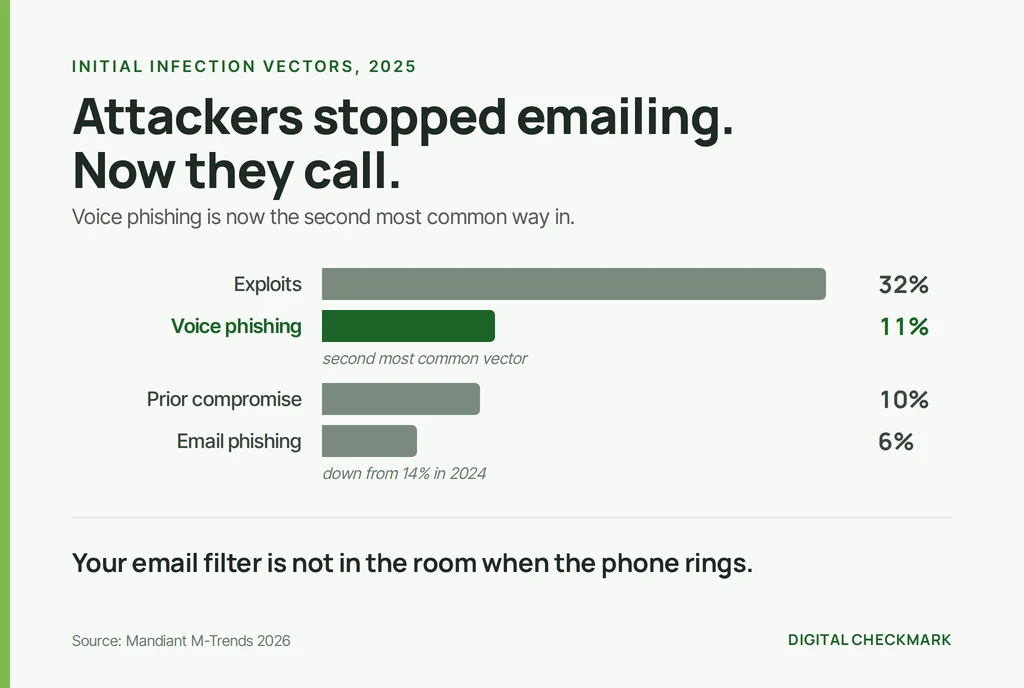
That is not a story about phishing declining. It is a story about a channel change. The filters, the banners, the DMARC records and the awareness training all point at the inbox. So the attackers picked up the phone.
And the voice on the phone says it is your IT provider
The pattern is consistent enough to be boring. Someone calls an employee, says they are from the help desk or the managed services provider, mentions a ticket or an outage that sounds plausible, and asks them to approve a prompt, read back a code, or install a small remote support tool.
That last one is the goal. The shift over the past two years has been away from stealing a password and toward getting hands on the keyboard through a legitimate remote monitoring and management session. A password can be reset. A remote session that the user approved is a signed-in attacker on a trusted device.
For a small business, the impersonation is easy to pull off, because the real IT provider genuinely does call, genuinely does ask people to approve things, and genuinely does run remote sessions.
Your email filter never sees that call
This is the uncomfortable part. Every control most businesses have bought for this sits in the mail path. SPF, DKIM and DMARC authenticate mail. The secure gateway scans mail. The banner that says “external sender” is added to mail.
None of them are in the room when the phone rings.
The only control that works at that moment lives in the employee’s head: knowing, before the call, what their IT provider will never ask for.
An expectation you set during the attack is worthless
Telling a client “we will never ask for your password” while they are on the phone with someone claiming to be you is too late. By then they are already being pressured by someone who sounds competent and in a hurry.
The expectation has to be old news by the time it matters. It has to be something they have read so many times they stopped noticing it, and can still recall when someone contradicts it.
Which means it needs to live somewhere they see constantly, without anyone having to do anything.
You already have that place
It is the bottom of every email you send.
An email signature is the only channel where you address every client, every prospect and every vendor at once, in the middle of a conversation they chose to have with you. It costs nothing, needs no campaign, and nobody unsubscribes from it.
Most businesses fill it with a logo, a job title and a confidentiality disclaimer that has never protected anyone. Here is what ours says instead:
We will never ask for passwords, payment details or remote access by email. If you receive an unexpected request, call us to verify.
Followed by the phone number to call.
That sentence does three things at once. It tells the client what to expect from us, so a contradiction stands out. It gives them a verification path that does not depend on the channel the attacker chose. And it demonstrates how we work without claiming anything we would have to prove.
It only counts if nobody has to remember to do it
A signature that each person pastes into their own mail client is not a control. Within a month you will have three versions of it, two people who dropped the line because it made the signature long, and one new hire who never had it.
To be worth anything it has to be applied centrally, from the directory, so that every mailbox gets it whether the person thinks about it or not. That also means the phone number is right everywhere, which matters more than it sounds when the whole point is giving people a number to verify against.
One detail worth getting right: the full version belongs on the first email of a thread. Repeating a warning eight times in one conversation trains people to skip it, which is the opposite of what you want.
What this does not do
It does not stop the call. It does not replace phishing-resistant multi-factor authentication, and it does not replace a verification procedure on your own help desk for callers claiming to be your staff.
It is a cheap layer that shifts the odds at the one moment no technical control is present. Treat it as that, not as a solution.
And it is worth saying plainly: if you tell clients you will never ask for remote access by email, you have to never ask for remote access by email. A promise your own team breaks is worse than no promise, because it teaches clients that the exception is normal.
Where to start
Write the sentence. Decide the verification number. Then find out how your mail platform applies signatures across the organisation, because doing it by hand is how it quietly stops being true.
If you want to check the other half of the problem while you are at it, our free email health check will tell you whether someone can send mail as your domain today. Both problems are about the same thing: making it harder to be impersonated.